
GREEN VALLEY AMATEUR RADIO CLUB
  • Home
    • Repeater Info
    • OUR Web SDR
  • Projects
    • 13.8 Volt Load
    • Antenna Ideas
    • Antenna Construction Ideas
    • Dummy Load
    • Past Projects >
      • Organization
      • RFI Mitigation >
        • Direction Finders
      • 2 Meter Gallery
      • Vertical Flagpole
      • Magnetic Loop
      • Wire Antennas
      • SDR Dongles
      • On the Ground Loop Antenna
  • Activities
    • Calendar
    • Christmas Party 2025
    • NETS >
      • Sunday - Two Meter Net
      • Tuesday - Oatmeal Net
      • Thursday- N7GV Simplex Net
      • Wednesday - Snow Bird Net
      • Inactive Nets >
        • Monday - DMR Net
    • Contests >
      • Winter Field Day
      • 7qp
      • Field Day
      • Arizona QSO Party
    • Social Time Out >
      • Wednesday - Breakfast
      • Thursday Evening Dinner
    • Picnics
    • Special Events
    • Titan Missile Museum
    • Driveouts
    • Road Cleanup
    • Parks on the Air
    • HamFest 2025
  • About
    • 2025 Board Members
    • 2025 Committees
    • Meeting Minutes
    • For New Members
    • Get Help
    • Ham Radio Sites
    • Classes & VE Testing
    • CW Interest
    • Ready, Set, Go Info >
      • Ready, Set, Go
      • Your Go Kit
      • My Alerts
    • Donations of Radio Equipment
    • History
    • Gallery
    • GVARC Certificates
    • EchoLink
    • BaoFeng HTs
    • Contact Us
    • We belong to ARCA
    • Miscellaneous >
      • Emergency Plan
      • Links
      • Technical Blog
  • Members
    • Ham Gear for GVARC Members
    • Current Roster
    • GVARC Logo Items
    • Inventory
    • Members We Honor
    • Name Badge Request
    • DMR Info
    • Win System
    • Member Profiles

Club Station

Picture

Changes are afoot.....

Picture
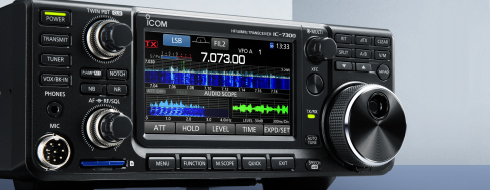
Our club station is undergoing some changes in order to make it more 'operator' friendly.   We have new Icom 7300 and some of our members are working on a computer and software which will make the rig remotely accessible. Those wishing to access the radio over the internet will need to purchase client software, after a test run and sign up for an open slot.
Members wishing to use the Club Station in person, should read the latest update on the Members page...

What a head start?  This is the link to download the instruction manual from the Icom Manuals and download page.

Picture
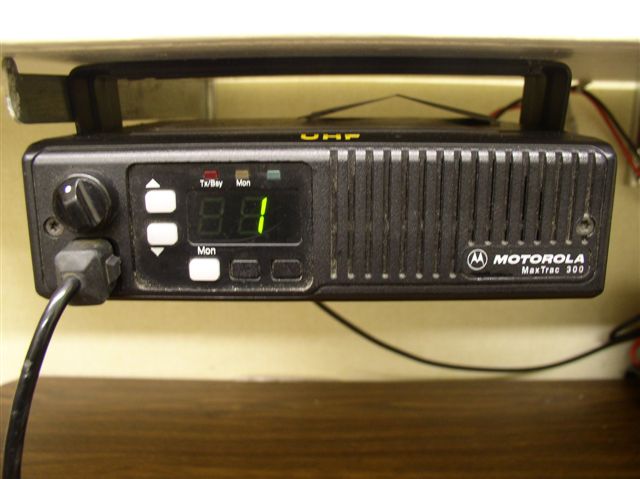
One November a big step was taken at the Radio Club Station to advance it's emergency usefulness on the 2 meter and 440mhz band. The club has obtained UHF and VHF Motorola "Max Trac 300" radios that are channelized and very easy to operate, On-Off volume control and a Up/Down channel select buttons are the only controls.

Rudy N3EBG made the stenciled wording, Ron VE6RGP supplied the mounting brackets and miscellaneous cables. The power supply was donated by the SAV a while back.

Picture

This information is dated.  Check the Members page for the latest access information.  It is changing often....

Picture
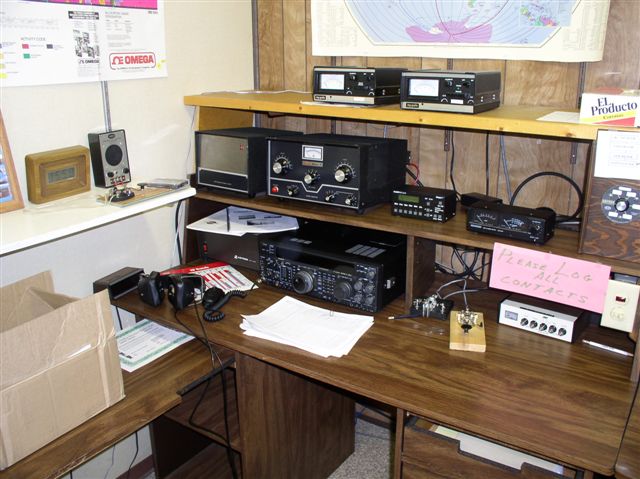
Using the Radio Room at the Sheriff’s Auxiliary Volunteers of Green Valley

When entering the SAV Building to use the Radio Room, always wear the Club ID Badge which you received from the club. If you do not have one, contact the Treasurer.

You must gain access to the radio room during normal SAV office hours, Monday through Friday 8:00 am to 4 pm. If you elect to remain in the radio room after hours, advise them that you will exit the building using either of the doors from the classroom, ensuring that they lock behind you. Should you need access to the Radio Room during non-office hours, contact Tom Lang or  the current GV ARC President.

Procedure when using the Radio Room
  1. Sign in on the log to the left of the reception desk.
  2. Ask the Receptionist for the Radio Room Key
  3. Unlock the Radio Room Key
  4. RETURN the key to the Receptionist
  5. While in the radio room, turn on the 2 Meter portable radio in the Radio Room by pressing it down into the charge. This radio remains on the SAV Repeater frequency, 145.27 Mhz.

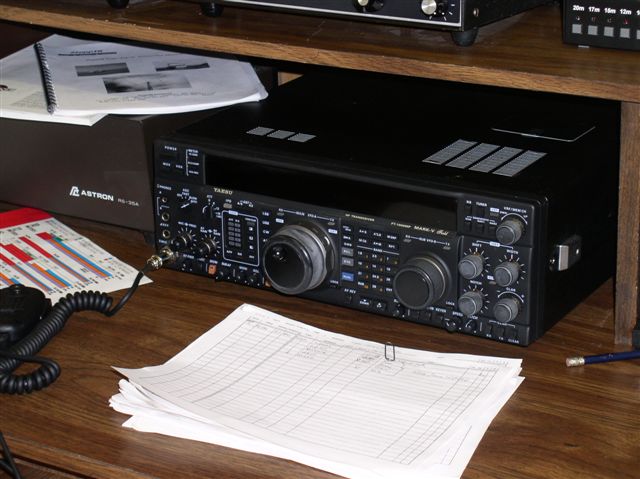
Procedure For Using the Icom 707 HF Transceiver
  1. Turn on the Master Power switch, located in the center of the bench.
  2. Turn on the RS-35A power supply for the Icom 707 High Frequency Transceiver
  3. Turn on the power switch for the Icom 707 HF Transceiver
  4. Turn the Antenna switch from Ground to the Beam for 10, 15 & 20 Meters.
  5. Focus on 20 Meters. 10 and 15 meters are currently (December 2005) dead and the new antenna for 40 and 80 meters is not yet installed.

  6. Turn on the power to the Rotor Controls for the Beam antenna. (20-15-10 meters on the left and 40 - 80 Meters on the right). Rotor controls are done by using two buttons at a time, first press down the brake lever, then the counter or clockwise rotation button. The antenna cannot rotate past south in either direction.

  7. When using the Radio, select the appropriate Mode (CW, AM, FM, USB (10 - 20 Meters), LSB (40 - 80 Meters).
    • TS is Tuning Select. It allows you to pick how fine the frequency selection will be, toggle between Band, Hz., Khz or Mhz.
    • ATT is the Attenuator
    • NB is the Noise Blanker
    • RIT allows you to hold the transmit frequency, but move the receive frequency to match the other stations transmit frequency.
    • A/B allows you to select one frequency to Transmit on and receive on another, or preset two frequencies and bounce between the two by pressing the A/B button. I have seen the second option used to move to an alternative frequency when you connect with someone on a Net. The first option is used when a person with privileges to transmit on a frequency you cannot will transmit on their frequency, you will listen, you will transmit on a legal frequency for you and they will listen to that frequency. Apparently used when Dxing.
  8. Log every contact on the Call Log in the Radio Room.

When leaving the room, Reverse the process….
  1. Turn off the power to the Rotor Controls.
  2. Turn off the power switch for the Icom 707 HF Transceiver
  3. Turn the Antenna switch to Ground.
  4. Turn off the RS-35A power supply for the Icom 707 High Frequency Transceiver
  5. Turn off the Master Power switch, located in the center of the bench.
  6. Turn off the 2 meter hand held radio by pulling it out of the charger.
  7. Turn off the lights to the room.
  8. Lock the Radio Room Door
  9. Log out on the Log Sheet.
  10. Wish the Receptionist a good day!

The second radio in the room is an all purpose 2 Meter Transceiver.
More later on how to use the Antenna Tuner, Linear Amplifiers and other gear in the room.

  • Home
    • Repeater Info
    • OUR Web SDR
  • Projects
    • 13.8 Volt Load
    • Antenna Ideas
    • Antenna Construction Ideas
    • Dummy Load
    • Past Projects >
      • Organization
      • RFI Mitigation >
        • Direction Finders
      • 2 Meter Gallery
      • Vertical Flagpole
      • Magnetic Loop
      • Wire Antennas
      • SDR Dongles
      • On the Ground Loop Antenna
  • Activities
    • Calendar
    • Christmas Party 2025
    • NETS >
      • Sunday - Two Meter Net
      • Tuesday - Oatmeal Net
      • Thursday- N7GV Simplex Net
      • Wednesday - Snow Bird Net
      • Inactive Nets >
        • Monday - DMR Net
    • Contests >
      • Winter Field Day
      • 7qp
      • Field Day
      • Arizona QSO Party
    • Social Time Out >
      • Wednesday - Breakfast
      • Thursday Evening Dinner
    • Picnics
    • Special Events
    • Titan Missile Museum
    • Driveouts
    • Road Cleanup
    • Parks on the Air
    • HamFest 2025
  • About
    • 2025 Board Members
    • 2025 Committees
    • Meeting Minutes
    • For New Members
    • Get Help
    • Ham Radio Sites
    • Classes & VE Testing
    • CW Interest
    • Ready, Set, Go Info >
      • Ready, Set, Go
      • Your Go Kit
      • My Alerts
    • Donations of Radio Equipment
    • History
    • Gallery
    • GVARC Certificates
    • EchoLink
    • BaoFeng HTs
    • Contact Us
    • We belong to ARCA
    • Miscellaneous >
      • Emergency Plan
      • Links
      • Technical Blog
  • Members
    • Ham Gear for GVARC Members
    • Current Roster
    • GVARC Logo Items
    • Inventory
    • Members We Honor
    • Name Badge Request
    • DMR Info
    • Win System
    • Member Profiles